
Yousician: Learn & Play Guitar
Yousician Ltd.Education
4.438.13K Reviews
- Version
- 5.43.3
- Installs
- 50.00M
- Age Rating
- Everyone
Screenshots

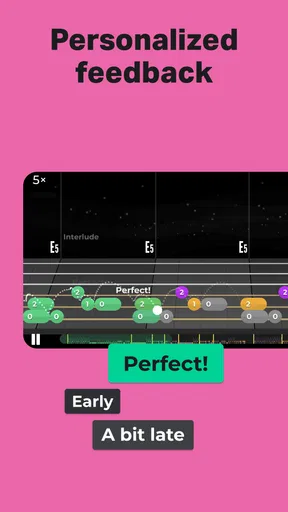
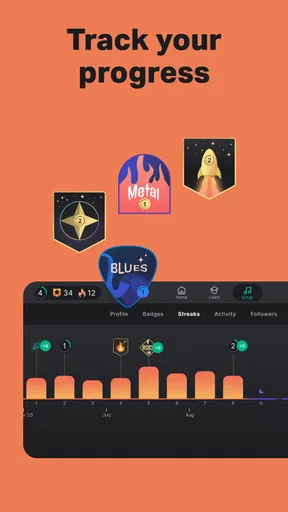

Our Review of Yousician: Learn & Play Guitar
 Analysis by Appyee
Sharing a guitar-learning app at home can sound simple: one person opens it, another picks up the instrument, and practice begins. In reality, different hands, goals, and schedules make that routine less straightforward. I’d treat Yousician as a guided practice tool for whoever is playing at the moment, rather than assuming one shared screen automatically creates a shared learning plan. That distinction helps keep expectations sensible when a household has a beginner, a returning player, or someone who just wants to try a few songs.
One screen, different learning needs
A realistic household use might be a parent using a short practice window before dinner, then a teenager taking a turn later with a different level of confidence. The app’s lessons and song challenges can give each player something concrete to work on, but the person holding the guitar still needs to know what they want from that session. I’d agree on a simple handoff: finish a lesson, put the guitar down, and let the next person start fresh rather than treating the previous player’s progress as a group score.
This setup is most useful when people are taking turns with the same instrument and device, not when several players expect simultaneous coaching. The microphone-based feedback is tied to the sound the device hears, so nearby talking, another instrument, or someone tuning in the background can make practice less focused. A quieter corner and one player at a time are practical improvements, not elaborate setup requirements.
Keep practice and progress boundaries clear
Before sharing a device, I’d check which account is open and whose learning path is being used. Personalized lessons are valuable precisely because they respond to an individual’s level and goals; mixing several people’s practice into one profile can make that guidance less meaningful. If people have separate accounts available to them, keeping practice under the right account is the cleaner approach. If not, take turns deliberately and avoid assuming that a single progress record will accurately represent everyone.
That boundary matters especially for a beginner. A more experienced player might be tempted to jump ahead or demonstrate a difficult part, but the app’s feedback is meant to evaluate the sound it hears, not to understand who is playing or why. I’d have each learner choose a manageable lesson before starting and let the less experienced person set the pace. It reduces frustration and makes the session feel like practice rather than a contest.
Making a routine work around real schedules
Short lessons are a natural fit for a busy day, but I wouldn’t measure a good session only by how many screens or songs someone completes. A useful routine is to spend a moment tuning, focus on one skill, then replay the same passage slowly enough to notice what changed. The immediate scoring can make repetition feel like progress, yet the more important question is whether the player can make the movement comfortably and repeat it without rushing.
For a shared household, a small coordination rule helps: decide who has the instrument, where practice happens, and when the room needs to stay quiet. That avoids the common problem of one person trying to hear the app while someone else talks over the guitar. It also makes the app easier to put down; a short session can have a clear ending instead of turning into an open-ended demand on everyone’s time.
Age, supervision, and realistic expectations
The app is rated for Everyone, which makes it broadly approachable from an age-rating perspective, but I would still choose practice material and screen time with the individual learner in mind. Younger players may benefit from an adult helping with the instrument, reading instructions, and keeping sessions balanced. The rating does not tell a family whether a particular lesson is a good fit for a child’s attention span or guitar size, so a quick trial together is more useful than assuming the label settles every question.
Yousician is an education app from Yousician Ltd. It has a 4.5 average from around 519,000 ratings, and more than 10 million installs. Those figures suggest a widely used option, but they don’t guarantee that its feedback will suit every player. I’d use the app as a practice guide, not as a substitute for listening carefully, learning basic instrument care, or asking a teacher to correct habits that a phone microphone cannot see.
It’s free to start, and in-app purchases range from $1.99 to $209.99 per item. Since the free experience may be enough to judge whether the teaching style clicks, I’d try it before spending. If several people in the home are interested, decide together who will use it and whether the available access fits that plan; don’t assume a purchase automatically creates separate learning paths or household sharing arrangements.
On Android, the current version is 5.25.0 and requires Android 8.0 or later. That makes the device check easy before anyone builds a practice routine around it. The app was released on May 26, 2015, and its long-running presence does not change the main question for a household: does the interactive format help the person holding the guitar practice more consistently?
How the lessons fit into guitar practice
Ever found yourself air-guitaring to your favorite tunes, wishing you could actually play that riff? Well, Yousician: Learn & Play Guitar might just be your new best friend. I've been noodling around with this app for a while, and let me tell you, it's like having a personal guitar teacher in your pocket.
Getting Started with Yousician
The first thing you notice when you fire up Yousician is how user-friendly it is. The app welcomes you with a slick interface and gets you set up in no time. After answering a few questions about your skill level and goals, you're thrown right into the action. No fuss, no muss.
What I love is the choice you get: whether you're picking up a guitar for the first time or you're a seasoned strummer looking to polish your skills, Yousician has something for everyone. The app personalizes your learning path, which feels super motivating.
Features That Hit the Right Note
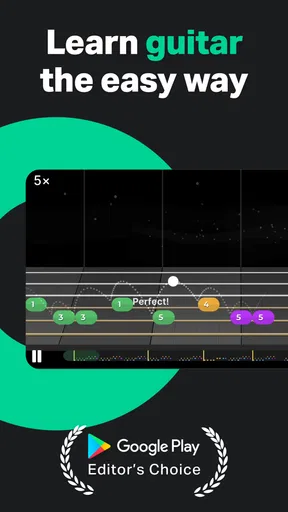
One of the stand-out features is the app's ability to listen to you play. Yep, you heard me right. It uses your device's microphone to track your performance, and it gives real-time feedback. It's kind of like having a coach who isn’t afraid to tell you when you're off-key. But don’t worry, it’s all done in a constructive way.
The lessons are broken down into bite-sized chunks, which is perfect for those with a busy schedule. You can squeeze in a quick 10-minute session during your lunch break or dive into a longer practice when you have more time.
Song Library
The app boasts an impressive library of songs across various genres. Whether you're into rock, pop, or something a little more classical, there's a good chance you'll find something that tickles your fancy. The songs are categorized by difficulty, so you can work your way up from twinkle-twinkling your first notes to shredding like a pro.
When choosing a song, I’d use difficulty as a guide rather than a promise that it will feel easy. A piece can be labeled at a suitable level and still expose a particular weakness, such as changing chords smoothly or keeping a steady rhythm. If that happens, I’d return to a lesson that targets the underlying skill instead of repeatedly forcing a full song that remains frustrating. That makes the library more useful as a source of motivation, not just a playlist to work through.
Challenges and Community
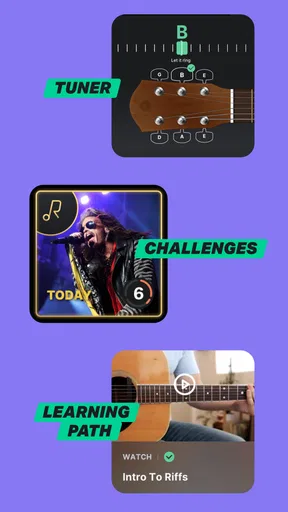
Yousician keeps it interesting with weekly challenges and a vibrant community. You can compete with other users around the world, which adds a fun, competitive edge to your practice sessions. Plus, seeing other people progress is super encouraging.
There's also a social aspect where you can connect with other learners. Sharing your progress or asking for tips from fellow guitarists can be a great way to stay motivated.
For me, challenges work best as a nudge to pick up the guitar, not as a measure of whether I’m becoming a better musician. A strong score can reward accuracy on a particular exercise, while musical confidence also depends on relaxed timing, clean transitions, and listening to the sound as a whole. If competition makes a learner tense, it’s perfectly reasonable to ignore that part and use the lessons privately. The useful question is whether the activity encourages another thoughtful practice session.
What it can and cannot teach on its own
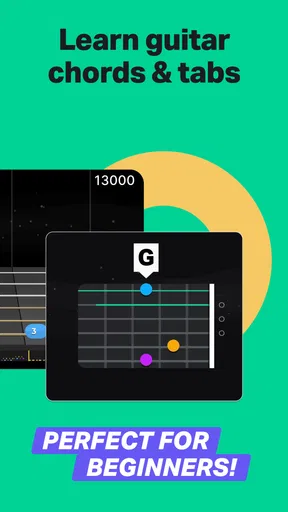
The microphone feedback is a distinctive advantage over a video lesson or a printed chord sheet: it gives the learner a response while they are playing, rather than leaving every correction until later. At the same time, a phone hears sound; it cannot watch finger pressure, posture, or tension in someone’s wrist. If a note sounds wrong, I’d check the fretting hand and tuning before assuming the app has identified the whole problem. A teacher or a knowledgeable player can help with physical technique in ways an audio-based lesson cannot.
Compared with free video tutorials, the app offers a more guided sequence and interactive listening, while videos can be better when you want to pause, replay a visual demonstration, or learn from a particular instructor’s explanation. A traditional guitar teacher can observe technique and tailor advice in person, but that means arranging lessons around another person’s schedule. I see Yousician as strongest for regular, self-directed practice between those alternatives, rather than a universal replacement for either.
It also suits people who like clear prompts and quick feedback more than players who want to explore entirely by ear. If your main goal is improvising, composing, or learning a song in a style the lesson path does not emphasize, you may prefer a teacher, a focused tutorial, or simply working out music by listening. The app can help build practical playing habits, but the learner still has to decide what kind of musician they want to become.
Is It Worth the Strum?
Let’s talk about the elephant in the room: the cost. Yousician offers a free version, but if you really want to dive deep, the premium subscription unlocks a world of content. It might seem a bit pricey at first glance, but considering the cost of traditional lessons, it’s a steal.
The subscription gives you unlimited lesson time, access to all songs, and a bunch of other features that can really accelerate your learning. It’s definitely worth considering if you’re serious about your guitar journey.
I would make the decision after trying the free option with a specific goal in mind: for example, learning whether the feedback makes basic practice clearer or whether the song-led approach keeps a beginner coming back. Someone who expects unlimited material without paying may be disappointed by the boundary between free access and the paid experience. Someone who has already found a steady routine may get more from considering the upgrade, but only if the extra access is genuinely useful to their practice.
The Final Note
In a nutshell, Yousician: Learn & Play Guitar is a fantastic tool for anyone looking to learn guitar or improve their skills. It’s accessible, engaging, and packed with features that make learning fun and effective. Whether you're a total newbie or someone looking to refine your craft, this app has got you covered.
So, if you've been dreaming of serenading your friends or jamming out in your living room, give Yousician a go. Who knows, you might just become the next guitar hero!
My household verdict is that it works best when one person owns each practice session, even if everyone takes turns using the same device. Keep the room reasonably quiet, choose a lesson or song that matches the player’s current ability, and treat the score as guidance rather than a final judgement. Beginners who want structure and a reason to practice are likely to appreciate that rhythm; experienced players seeking detailed technique correction, or families expecting automatic shared profiles, should look elsewhere or use it alongside another learning method.
Privacy and Permissions
See what permissions an app requests and how it handles your data.
- Location
- precise location (GPS and network-based)
- Microphone
- record audio
- Other
- view network connections, pair with Bluetooth devices, access Bluetooth settings, full network access, run at startup, control vibration, prevent device from sleeping, Google Play license check
Verdict
Strengths of Yousician: Learn & Play Guitar
- Engaging and interactive lessons.
- Wide range of musical styles available.
- Real-time feedback on performance.
- Suitable for all skill levels.
- Motivational progress tracking.
Limitations of Yousician: Learn & Play Guitar
- Requires a subscription for full access.
- Limited offline functionality.
- Some features need stable internet.
- Occasional app performance issues.
- Not all songs are available.
Other Releases by Yousician Ltd.
View All
GuitarTuna: Tune & Play Guitar
Tools4.5
Similar Picks in This Category
View All
Duolingo: Language Lessons
Duolingo4.7

Google Classroom
Google LLC2.8

Unacademy: Learn & Crack Exams
Unacademy3.2

Bible App for Kids
Life.Church4.4

Cake - Learn English & Korean
Cake Corp.4.7

Brainly: AI Homework Helper
Brainly4.5
Frequently Asked Questions
What is Yousician and how does it work?
Yousician is an interactive app designed to help users learn and play guitar, bass, piano, ukulele, and singing. It uses your device’s microphone to listen to your playing and provides real-time feedback. The app offers a variety of lessons, exercises, and songs to practice, catering to different skill levels.
Is Yousician suitable for beginners?
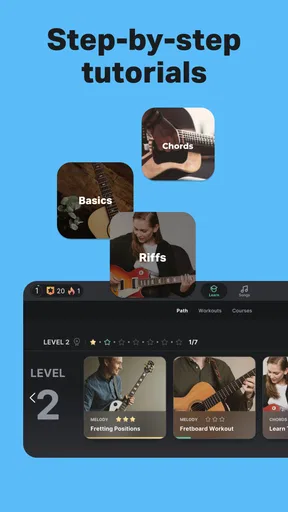
Yes, Yousician is ideal for beginners. It offers step-by-step lessons that start with basic techniques and gradually progress to more advanced skills. The app’s guided tutorials and instant feedback make it easier for new learners to understand and improve their playing.
What devices are compatible with Yousician?
Yousician is compatible with both Android and iOS devices. It requires a microphone to capture the sound of your instrument, so ensure your device has a functioning microphone. Additionally, the app is available for download on Windows and macOS for those who prefer using a computer.
Does Yousician offer a free version?
Yousician provides a free version that includes limited access to lessons and songs each day. For more extensive access and additional features, users can opt for a premium subscription, which offers unlimited playtime and a wider range of learning materials.
How does Yousician handle different skill levels?
Yousician caters to various skill levels by offering customized lesson plans. Users can select their skill level upon starting, and the app will tailor lessons and exercises accordingly. Whether you’re a beginner or an advanced player, Yousician adjusts to your pace and helps you progress.
